Build your HOA an amazing Website!
Unlock Higher Property Values
(No credit card required)
How an HOA Resident Portal Reduces Complaints and Builds Trust

Keep Your Whole Community in the Loop
Homeowners trust boards that communicate clearly. A free Neighborhood.online website makes it easy to share meeting minutes, post updates, and give residents one place to find everything they need.
Build Your Free HOA WebsiteUpdated September 9, 2026
Most HOA complaints do not start with a real problem. They start with a homeowner who could not find an answer. Someone wants to know when the pool reopens, whether their dues payment went through, or why the board approved a fence for one neighbor and not another. When that information is hard to reach, frustration fills the gap, and the board ends up fielding the same questions over and over. An HOA resident portal is one of the simplest ways to close that gap, because it gives homeowners a single, reliable place to find what they need without having to email a volunteer and wait three days for a reply.
If your board feels like it spends more time answering repeat questions than actually running the community, this is worth a read. A good portal will not solve every dispute, but it will quietly remove a huge share of the confusion that turns small questions into loud complaints.
What an HOA Resident Portal Actually Is
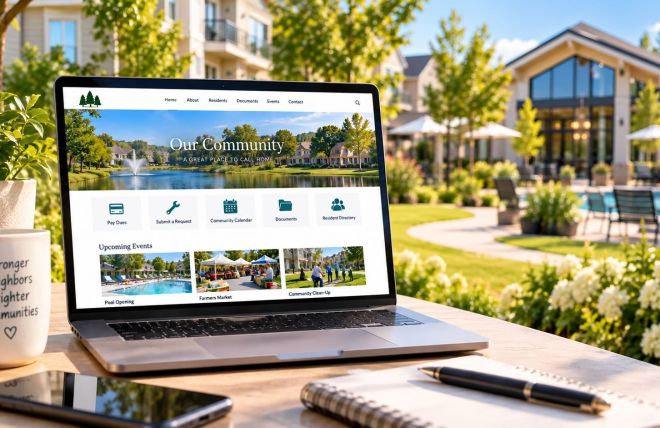
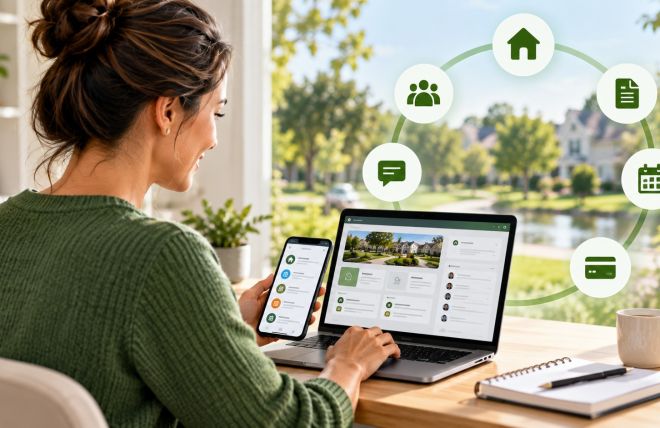
An HOA resident portal is a private, members-only section of your community website where homeowners can log in and take care of HOA business on their own time. Think of it as the difference between calling a store to ask if something is in stock versus checking the website yourself at 10pm. Same information, far less friction.
Inside a typical portal, homeowners can do things like:
- Pay their dues or check whether a payment cleared
- Read and download governing documents, bylaws, and meeting minutes
- See the community calendar and upcoming events
- Submit a maintenance request or an architectural change request and track its status
- Look up contact information for the board or a committee
- Read announcements and community updates in one running feed
Here is a real-world example. Say a homeowner wants to repaint their front door and needs approval first. Without a portal, they email the board, wait, maybe get a reply, maybe get told to fill out a form they now have to hunt for. With a portal, they log in, find the architectural request form, submit it with a photo, and watch it move from "submitted" to "under review" to "approved." Nobody had to chase anybody. That is the whole idea.
Why It Matters for HOAs
Boards often underestimate how much of their workload is really just information retrieval. When homeowners cannot find something themselves, every one of those small needs lands on a volunteer's plate. Multiply that across a few hundred homes and you get burned-out board members and a community that feels like it is being ignored, even when the board is working hard.
The bigger risk is trust. When people cannot see how decisions get made or where their money goes, they tend to assume the worst. Silence creates space for rumors. A homeowner who cannot find the budget starts to wonder if something is being hidden, even when the truth is simply that nobody posted it anywhere visible. This is how ordinary communities end up with suspicion, contested elections, and neighbors who show up angry to meetings.
There are a few common mistakes boards make that a portal helps prevent:
- Keeping important documents in a single board member's inbox or filing cabinet, where they vanish the moment that person steps down
- Answering the same question by email dozens of times instead of posting the answer once where everyone can see it
- Making decisions that feel secret simply because there was no easy place to share the reasoning
- Losing track of maintenance and architectural requests, so homeowners feel like their concerns disappear into a void
None of these come from bad intentions. They come from running a community with tools that were never built for the job. The good news is that fixing the tools fixes most of the friction.
How HOA Boards Should Handle It
Rolling out a portal is less about the technology and more about deciding what belongs in it and keeping it current. Here is a practical way to approach it.
Start with the questions you already answer most. For one week, jot down every question homeowners ask the board. You will probably see the same handful again and again: dues, rules, meeting dates, and how to request something. Those top questions are exactly what your portal should answer on day one. You do not need every feature at once. You need the five things people actually ask about.
Put your core documents in first. Load your governing documents, current budget summary, recent meeting minutes, and a simple community calendar. If a new homeowner can find the rules and the meeting schedule without emailing anyone, you have already eliminated a large slice of your inbound questions. Many boards find that moving from paper and scattered files to organized digital document storage is the single change that saves the most time.
Make dues payment easy to see and easy to do. A big share of complaints are really just anxiety about money. "Did my payment go through?" and "Why am I being charged a late fee?" go away fast when a homeowner can log in and see their own account balance and history. Even if you are not ready to collect payments online yet, showing account status is a strong start.
Set one rule for keeping it current. A portal that is out of date is worse than no portal, because it teaches people not to trust it. Assign one person, or rotate the job, to post announcements and update the calendar on a set schedule. A tidy resident portal that is updated every week beats a feature-packed one that nobody maintains.
Tell homeowners it exists, more than once. Adoption is the quiet failure point. Send the login link in a welcome message, mention it at meetings, and put it on any printed notice. When a homeowner emails a question the portal already answers, reply kindly and point them to it. After a few gentle nudges, people form the habit of checking first.
How Technology Can Help
This is where the right platform makes a real difference. A modern HOA platform bundles the portal together with the other tools a board needs, so you are not stitching together a website, a document folder, a payment app, and an email list that never quite talk to each other. Tools like Neighborhood.online let a board set up a members area with document storage, an event calendar, online dues, and community announcements in one place, which means homeowners get a single login for everything instead of a scavenger hunt across five services.
The practical payoff shows up in your inbox. When documents live in the portal, homeowners stop asking where to find them. When the calendar is current, people stop asking when the next meeting is. When account balances are visible, the dues questions slow to a trickle. A portal turns your website from a static brochure into the working communication hub your community actually uses, which is the difference between a site that just exists and one that reduces your workload every week.
One thing worth keeping in mind as you choose tools: the software that runs your community and the software that keeps your books are two different jobs. It is usually cleaner to keep your accounting and management systems separate so your financial records stay tidy and your portal stays simple for residents to use. A platform that handles member communication well does not need to also be your full accounting system to be worth it.
The Bottom Line
Most of the noise a board deals with is not conflict. It is confusion, and confusion is fixable. An HOA resident portal gives your community one trustworthy place to find answers, track requests, and see how the neighborhood is run, which cuts down on repeat questions and builds the kind of quiet trust that makes a board's job easier. You do not have to digitize everything overnight. Start by loading your key documents and answering your most common questions, then grow from there. If you want a sense of what a portal can do before you build one, take a look at the benefits a resident portal brings to an HOA community and pick the one feature that would save your board the most time this month. That single step is usually enough to feel the difference.
Self-managing a community is a real job, but it does not have to be a thankless one. The right tools give volunteer boards their time back, and there is a growing set of software built specifically for self-managed HOAs that makes running things yourself genuinely doable. A portal is a great place to begin.